Pages

Showing posts with label eBook. Show all posts

Friday, 19 September 2025

Turning docx files into ePubs

If we want to create an ePub from an MS Word file, all we need to do is to set up our file as a .docx file. If we want all the bells and whistles in our ePub file, then we need to set up a title page, a table of contents, chapter headings, illustrations, and a reference list or appendices in the .docx file before we begin.

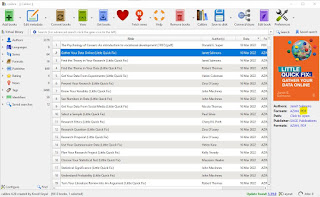
I prefer to use Calibre, a piece of 2006 freeware/shareware created by Kovid Goyal, using Linux OS. I have been using it for years to read my ebooks, and I find it is really easy for reading almost any published format. Even better, Calibre will allow me to convert one format into another, which means if I have a format that doesn't read well on my phone, I can convert it on my PC, copy it across and then be able to read the item on my phone's e-reader.

Our first step is to ensure that Calibre is installed, and that we have the latest version. We set up our Calibre preferences, including setting default upload folders for Calibre files.

Once we are ready, we copy our Word file to be converted into our default upload folder. We open Calibre, and click the "Add Files" button and upload our Word file. Once our file has been uploaded, we select our newly included Word file, and click the Convert button on the toolbar. A dialogue box will appear: simply select the EPUB format. In the Page setup tab, we might want to select an output profile to match our particular e-reader; and in the Heuristic processing tab (in the left-hand icon bar) if we tick "Enable heuristic processing" is ticked our table of contents should link automatically. Most of the rest of the settings we can leave alone.

In a few minutes, we will see that our file now has an EPUB format showing alongside the Word format. Click on the EPUB Format and the ePub format will open. It is that easy.

If any of the layout or flow doesn't work as we expect, we can have a play around with the settings to get our ePub to look just as we want it. The EPUB output left-hand icon may help here: we can edit fonts, layout, styling etc. 

I hope that helps!


Sam

read more "Turning docx files into ePubs"

Wednesday, 27 July 2022

Turning Calibre ePubs into pdfs

I have written about the freeware ebook reader, Calibre before (read here). But I have not yet mentioned that this piece of kit can also convert our ebook formats from ePub or mobi to pdf files. However, Calibre's default settings don't provide a tidy result: for example, the margins are set to be too narrow; the page format way too short, and the font size is too large. A few tweaks, as advised by Rohde (2015) below, will give us a much more readable result.

The instructions are (Rohde, 2015):

  1. Open Calibre and select the file
  2. Right click, select Convert Books | Convert Individually
    calibre-1
  3. Change the output to PDF on the top right corner of the screen. Go to ‘Page Setup’ tab and change all margins to 75 pt

    calibre-2-page

  4. Go to ‘PDF Output’ and set the following settings

    calibre-3-pdf-output

Now we simply click "OK", and we are done. Click on pdf under the format for the file type in the right-hand detail side bar to open our brand new pdf.

Thanks to Max Rohde for the tip!


Sam

References:

Rohde, M. (28 January 2015). Rendering Beautiful PDF Documents with Calibre. https://maxrohde.com/2015/01/28/rendering-beautiful-pdf-documents-with-calibre/

read more "Turning Calibre ePubs into pdfs"

Wednesday, 5 April 2017

How to read 200 books a year

I read an interesting post by Charles Chu recently on Medium (6 January 2017).

Apparently the average American loses 608 hours of their lives annually on social media, and 1642 hours in front of the TV (Chu, 6 January 2017). Ouch. And if we think of the number of ...er ...'alternative facts' out there, perhaps this isn't the best use of our time.

It probably doesn't improve our thought or decision-making processes, either.

Charles laid out the mathematics instead for how to read 200 books a year (Chu, 6 January 2017. Also see the poster with this article). Surprisingly, it works out at 8 hours a week.

However, if we do the mathematics a different way, we need to read 3.8 books a week in order to read 200 in a year.

I think it will take most of us longer than 2 hours per book - particularly if we are using talking books, which average around 10 hours in length.

I listen to around two talking books a week, plus my other on-screen reading... my talking books get listened to at night using my iPod and earbuds, as I go to sleep. I also do a fair bit of technical reading, as a PhD scholar.

So I suspect that it would take us closer to thirty hours a week to get four non-fiction books read. Then we have enough time budget to read two and listen to two.

But even thirty hours is only just over four hours a day. Ditch the TV and social media for three nights, and four books a week is pretty do-able.

Read on!


Sam
read more "How to read 200 books a year"

Friday, 27 February 2015

How to write an eBook

This is a clever little presentation that outlines some of the tricks to writing a longer piece of work, regardless of what it is for. 

Applying these techniques will help you get whatever it is that you need to get done, done. Check out Uberflip's ideas:


Sam
  • Reference: Uberflip (2015). How To Assemble a High Converting eBook. Retrieved 27 February 2015 from http://visual.ly/how-assemble-high-converting-ebook?utm_campaign=website&utm_source=sendgrid.com&utm_medium=email
read more "How to write an eBook"